
Scenes / EDL / Dynamic metadata
Create HDR10+ metadata from scene analysis.
Calculate and edit dynamic HDR metadata for the picture content. HDRmaster combines scene detection, content statistics and curve editing for HDR10+ Profiles A, B and ADVANCED.
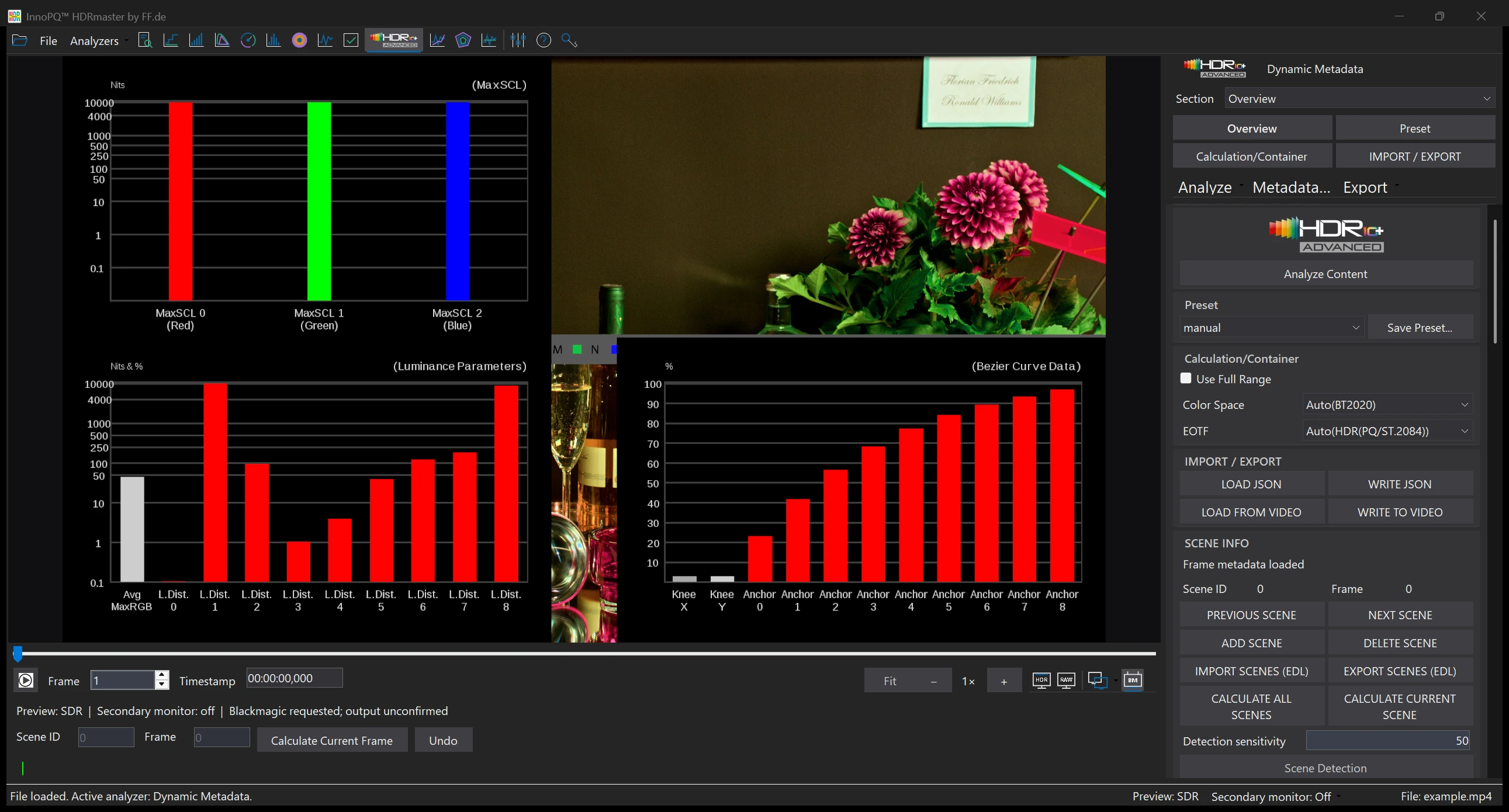
In this screenshot
- MaxSCL & Bezier parameters
- The charts show loaded metadata values for the selected frame.
- Scenes and export
- Scene Detection, scene calculation and JSON/EDL controls are directly accessible.
Match metadata to changing picture content.
Brightness and colour distributions change from scene to scene. Scene-based analysis provides the basis for creating dynamic metadata and refining it for individual scenes.
Scene detection, editable boundaries and EDL exchange make navigation easier. Content statistics, Bezier parameters and smoothing controls support metadata editing.
Follow the workflow
From scene detection to metadata export.
Analyse and detect scenes
Choose the source interpretation and run the scene analysis. Use sensitivity to investigate the detected boundaries, then check them against actual cuts.
Refine a boundary and visit the scene
Correct boundaries where required and navigate to representative frames. Verify that the interval describes the scene you intend to author.
Inspect the statistics and curves
Read MaxSCL, AverageRGB and MaxRGB distributions alongside the picture. Calculate or edit Bezier parameters and use the available smoothing controls deliberately.
Review the ADVANCED data
The additional distribution and colour statistics supplement the regular scene data for ADVANCED authoring.
Export and inspect the JSON
Use WRITE JSON to save supported scene data and parameters. Read the profile and relevant scene fields in the output. Use EDL separately for cut information.
What HDR10+ ADVANCED adds.
ADVANCED adds eleven distribution percentiles and twelve hue-sector MaxChroma values. These provide additional brightness and colour information for metadata authoring.
The extended percentiles are 7, 15, 30, 35, 40, 55, 60, 65, 70, 80 and 85 percent. Regular scene data and editable tone-mapping parameters remain part of the workflow.
Exchange scene boundaries through EDL and metadata and parameters through JSON. Embedding metadata into video requires the appropriate writing path for the codec and container.
Result
Edited scenes and exportable metadata.
Calculate data for all scenes or refine individual scenes. JSON export retains the profile, scene statistics and parameters for further exchange.
Inspect the exported metadata before delivery. When embedding it into video, check the output format against the HDR10+ support of the receiving playback chain.
The next step
Compare the source findings with the exported scene data. For an in-video metadata delivery, confirm your exact format and output requirements with FF Pictures.
Requirements & licenceCommon questions
HDRmaster questions
What does ADVANCED add to the analysis?
The analysis includes eleven extended luminance-distribution percentiles and twelve hue-sector MaxChroma values, alongside the regular scene data and editable parameters. HDR10+ ADVANCED is included in the current HDRmaster software.
Does EDL contain HDR10+ metadata?
EDL carries scene or cut information. Use the supported JSON or metadata output path to exchange the HDR10+ data.
Does profile selection guarantee playback on every display?
No. Profile selection, exported metadata, embedding and receiver playback are separate parts of the chain. Check the actual format and receiving setup.
Can I edit curves instead of accepting detection results?
The scene workflow provides Bezier parameter editing and available smoothing controls. Review the scene statistics and picture before choosing the parameters.
Licence & included tools
HDRmaster with Gamut Rings OFX.
Use HDRmaster to analyse video signals, inspect colour and create static and dynamic HDR metadata. Gamut Rings OFX is included for colour-gamut investigation in DaVinci Resolve.
- Windows software for one active computer per licence
- Transfer activation by deactivating the previous computer
- New versions are currently free of charge
- Order Choose your billing country and payment method in the Digistore24 checkout. Review the final price and purchase terms.
- Download After payment is received, open your delivery link and save the installer and licence key.
- Activate Install on your Windows workstation and activate your licence. Contact FF Pictures for questions about your setup.
799 EUR net
One-time purchase · one active workstation
Applicable taxes and the final total are shown in the Digistore24 checkout for your billing country.
Buy HDRmasterDigistore24
After payment is received, Digistore24 provides the software download and licence key. The checkout currently allows five downloads within three months of payment. Keep the installer, order details and licence key for later use.
You are ordering through Digistore24. The checkout shows availability for your billing country and the applicable purchase and return terms. For multiple licences or company procurement, contact FF Pictures.
Discuss my workflow or company order →