
Colour / P3 / BT.2020 / Gamut Rings
Identify colours beyond P3, including HDR highlights.
Assess how your material actually uses P3 and BT.2020. Gamut Rings separates colour distribution by brightness, revealing saturated shadows, midtones and highlights. Check which colours are present in the finished master.
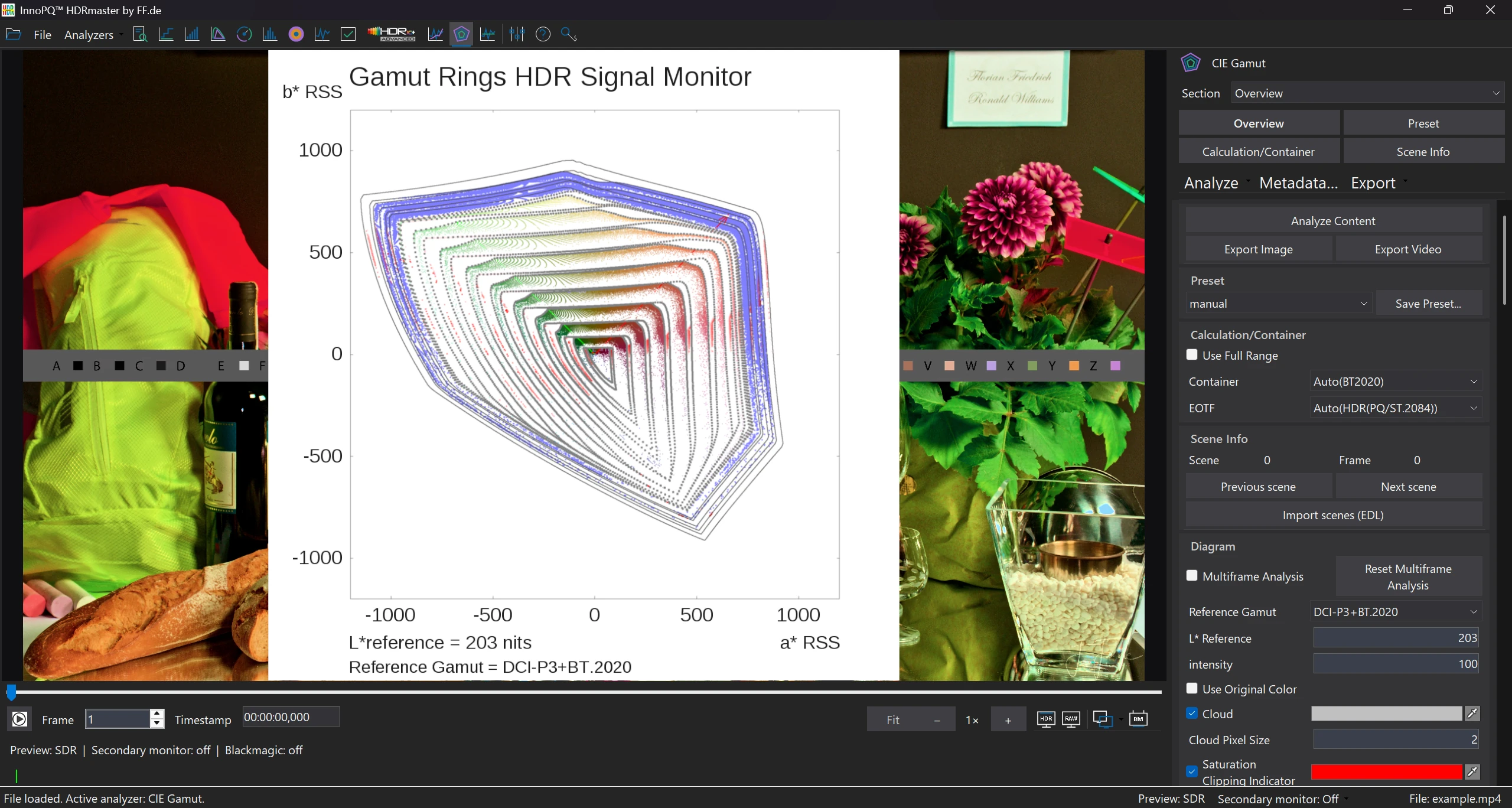
In this screenshot
- DCI-P3 + BT.2020
- Both references are selected in the diagram.
- 203-nit reference white
- The selected value is visible below the diagram and in the control panel.
How much wide colour gamut does the file use?
A BT.2020 container can hold colours entirely within P3. For grading and QC, the actual pixel distribution is what matters.
Gamut Rings shows saturation and gamut use at several brightness levels. The HDR extension adds rings above reference white for highlights and speculars, making colour volume readable in a two-dimensional view.
Follow the workflow
Analyse gamut use across brightness levels.
Choose the source interpretation
Confirm the EOTF, range, primaries and white point used for the analysis. These settings affect the meaning of the decoded values.
Set the reference gamut
Compare the same source against the relevant P3 or BT.2020 reference. Read the reference labels before describing any point as outside a gamut.
Select a lightness layer
Investigate shadows, midtones, highlights or specular regions. Note the selected layer and reference white alongside the result.
Locate a relevant colour in the image
Relate the plot to the picture and available pixel values. Use a chromaticity view when the question needs a further coordinate-based check.
Compare dark-region filtering deliberately
If a dark-region filter is used, preserve the whole-image view. Record the threshold so that noise or grain is not silently removed from the evidence.
Distinguish HDR colour from dark-region noise.
Saturated points can come from noise or grain in dark areas. Set a lower brightness threshold to examine gamut use above that region, then compare with the unfiltered analysis.
Additional HDR rings show the distribution above reference white. Ring spacing is not a linear nits scale; use the numerical readout for luminance values.
Gamut Rings OFX is included for DaVinci Resolve. Examine the distribution while grading, then check the exported file in HDRmaster.
Result
Assess the master’s colour distribution.
See which brightness ranges contain colours beyond P3 and how highlights contribute to the colour volume. Use this to investigate differences between the intended grade and the final encode.
Document the reference gamut, reference white and filter settings with the result. Pixel readouts let you investigate individual colours in more detail.
The next step
Inspect a relevant pixel or edge, then check that the final encoded file preserves the intended distribution. For the OFX route, confirm your Resolve and plug-in setup.
Requirements & licenceCommon questions
HDRmaster questions
Does BT.2020 metadata prove colours outside P3?
No. It names the signal container or interpretation. Investigate the actual pixel distribution against the chosen P3 reference.
Are the rings spaced in equal nits?
No. Do not treat ring distance as a proportional luminance ruler. Read the selected layer, values and reference white.
Can I ignore all dark colour values?
No. A filter is a defined comparison, not proof of invisibility. Keep the full distribution and state the threshold and interpretation.
Is Gamut Rings OFX part of the licence?
Gamut Rings OFX is included in the HDRmaster package for DaVinci Resolve. Check the intended host and plug-in configuration with FF Pictures.
Licence & included tools
HDRmaster with Gamut Rings OFX.
Use HDRmaster to analyse video signals, inspect colour and create static and dynamic HDR metadata. Gamut Rings OFX is included for colour-gamut investigation in DaVinci Resolve.
- Windows software for one active computer per licence
- Transfer activation by deactivating the previous computer
- New versions are currently free of charge
- Order Choose your billing country and payment method in the Digistore24 checkout. Review the final price and purchase terms.
- Download After payment is received, open your delivery link and save the installer and licence key.
- Activate Install on your Windows workstation and activate your licence. Contact FF Pictures for questions about your setup.
799 EUR net
One-time purchase · one active workstation
Applicable taxes and the final total are shown in the Digistore24 checkout for your billing country.
Buy HDRmasterDigistore24
After payment is received, Digistore24 provides the software download and licence key. The checkout currently allows five downloads within three months of payment. Keep the installer, order details and licence key for later use.
You are ordering through Digistore24. The checkout shows availability for your billing country and the applicable purchase and return terms. For multiple licences or company procurement, contact FF Pictures.
Discuss my workflow or company order →